
Boss Management
Open a held job's detail in Employment. The management section is available when its grade is recognized as a boss grade by the framework bridge.
Job and society overview
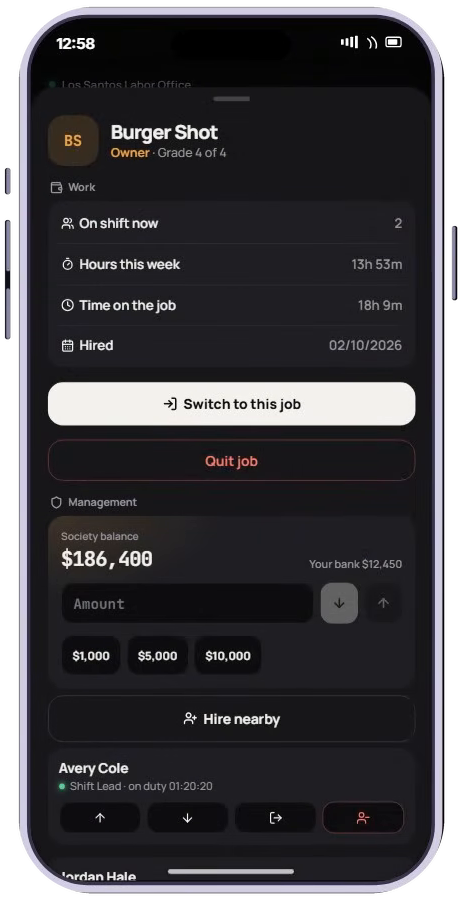
The job detail shows work time and hire information. Management adds the society balance and the character's available deposit-account balance when a society provider is available.
- Deposits use
Config.DepositAccount, defaulting tobank. - Withdrawals pay into
Config.WithdrawAccount, alsobankby default. Config.MaxTransactioncaps one transfer at500000by default.- A missing society provider does not disable saved-job switching, but society transfers need a valid account adapter.
Employee roster
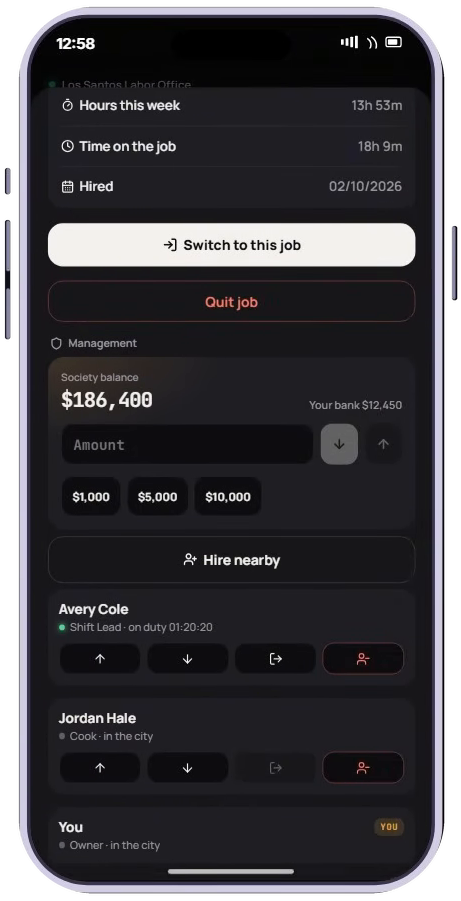
The roster lists employee names, grades, online status and whether they are clocked into this job. It is built from valid saved employees in the MultiJob table, joined to the framework's character table. The included query is capped at 60 employees.
| Action | What it does |
|---|---|
| Promote | Move an eligible lower-ranked employee to the next defined grade below the acting boss |
| Demote | Move an eligible lower-ranked employee to the previous defined grade |
| Clock out | Move an online employee currently working this job to the configured off-duty job |
| Fire | Remove the saved job and clear it from the character's active/offline framework job where applicable |
| Hire nearby | Add this job to an eligible nearby character |
Bosses cannot manage their own employee row or a rank equal to or higher than their own through these controls. Promotion cannot elevate the employee to the acting boss's grade.
Nearby hiring
Hire nearby lists nearby connected players. The selected target must still be within Config.HireDistance, which defaults to 12 metres, when the hire request is processed. They must not already hold this job and must have a free saved-job slot.
New hires receive the lowest available non-boss grade below the acting boss. If they are off duty or in an excluded active role, the new job can become active; otherwise it is saved alongside their current role.
Boss grades and providers
The bridge uses a grade's isboss flag when present (true, 1 or '1'). When that flag is absent, the grade name boss is used. The character can qualify through the active job or a saved held grade.
Society providers and editable adapters are documented in Integrations. Changing a display label in the phone does not grant a boss grade or create a society account.